We’ve produced this guide to help you deal with all the errors you’re likely to see when you’re uploading and importing your pension data files to now:u.
now:pensions caters for a wide range of sizes and types of workplace, from very small to larger and more complicated.
We’ve designed the guide to work for lots of different clients and systems, so not all the errors and warnings will apply to everyone.
Checking for accuracy
now:u is set up to help you make sure your pension data is as accurate as possible. There are two levels of checks when you upload a file.
File-level checks
These are to do with the structure of the file – for example, whether it’s in the right format and has the right number of columns and headers.
Field-level checks
These are to do with the information in the file. Every time you upload a file, now:u checks the data in your file and matches it against the information you’ve uploaded before to help make sure it’s accurate.
Warnings
The main difference between errors and warnings is that if you get a warning, you can usually carry on uploading your pension data file. But warnings have important information and you should check whether you need to do anything.
Email address formats
This section shows the format email addresses must be in for now:u to accept them.
National Insurance number (NINO) formats
This section shows the formats for NINOs and lists NINO formats that will not be accepted.
Updating this guide
We know systems and processes can change. So we update this guide from time to time to make sure it stays accurate. This version is dated 19 May 2025.
File-level checks
We check for the following errors.
- The file is not in CSV format
- The file size is zero
- Another file is currently being processed for the same payroll
- The file contains viruses or other potentially harmful content
- The file doesn’t have columns
- The file has no headers
- You’ve selected ‘headerless file’ but the file has headers
- The file only has headers and no other information
- The file has already been updated by another user
- The file name is longer than 240 characters
- The file name includes characters the system won’t accept
- The file is bigger than 70 mb
- You’ve tried to upload more than 5 files in your current session
If your file fails any of these checks, you’ll see an error message. You’ll need to fix the error and try uploading the file again.
File-level error messages
This table shows all the error messages and how to fix them.
| Code | Error message | How to fix it |
| A008 | We are unable to process your pension data file due to it being in an invalid format. Please ensure the file format is .csv. | Save your file in CSV format and re-upload it. |
| A054 | We are unable to process your pension data file as it does not contain any information. Please upload a different file. If there are no contributions to submit you will have to specify the option that there is no payroll file for the pay period. | now:u won’t accept empty files. If you don’t need to upload a pension data file for the current pay period – usually because you don’t have any worker updates or contributions to upload -choose I don’t have contributions in this pay period. |
| A138 | An import is in-progress for payroll code X, pay period Y. To proceed with this import please go to the relevant pay period’s file Upload history and then click the ‘Ref-id’ for the entry showing as ‘In progress’. (X and Y will be the actual values.) | If you’re currently uploading a pension data file for a particular payroll, you won’t be able to start a new file upload until that process is finished. If a file is already being processed following a payroll API call, you also won’t be able to start a new file upload manually until that process is finished. |
| V201 | Please check the file uploaded as it failed our virus scanning checks. Please reupload a clean file. | We scan all uploaded files for viruses or malicious content before processing. If our software detects any potentially harmful content, now:u won’t accept the file. Please generate a clean file and upload it. |
| V202 | We are unable to process your pension data file as it does not contain the column headers in the first row. If your file does not contain any headers please select the headerless file option before uploading the file. | Please tick the box to say your file has no header row before continuing. |
| A176 | We are unable to process your pension data file as the following headings are missing: {0}. Please add the missing column(s) to the file. | Please check the missing headings and add them to your file. |
| A177 | We are unable to process your pension data file as the following are not valid column headers: {0}. Please add the missing column(s) to the file. (0 will be replaced by real data in the actual error message.) | Please check your headers are spelt correctly. |
| V203 | We are unable to process your pension data file as you have confirmed you are loading a headerless file; however we have detected a header row in the file. Please check your data file and do not select the headerless option if the file does contain headers. | Please check your file and don’t select ‘headerless file’ if there’s a header row. |
| V204 | The processing cannot be accepted as another user has already updated the records. Please check the latest position of the file upload by going back to the dashboard and selecting the continue option. | Another user has already updated the records you are uploading. Go back to your dashboard and choose Continue to check the progress of the file upload. |
| V205 | The file doesn’t have any detailed records to process. | Check if the file should have any information besides the header row. If it should contain information, please correct the file and try uploading it again. If you don’t need to upload a pension data file for the current pay period, choose I don’t have contributions in this pay period. |
| V245 | We have been unable to process your file. The filename cannot exceed 240 characters. Please rename your file and upload again. | Please give your file a shorter name and try re-uploading it. |
| V246 | We have been unable to process your file. The provided file name has unacceptable characters. The only characters we accept are – [A-Za-z0-9$()[]{}+-._;&$~%^=’#`£! ]. Please correct the file name and resubmit the file. | Please rename your file using only the characters the message shows. Then try re-uploading it. |
| V258 | The file being imported exceeds the systems maximum limit of 70 MB. Please get in touch with us via web chat to resolve the issue. | If your file is too big to upload, you’ll need to talk to us on webchat to sort this out. |
| V259 | You have exceeded the maximum number of files a user can submit within a minute for a single login session, which is 5 files. Please wait 1 minute and then try again. | You can’t upload more than 5 files in one session. Please wait a minute, then try again. |
Field-level checks
Once your file has passed these checks, it comes to the second level: field-level checks.
All rows that fail one or more field-level checks are collated and shown on the Validate step of the upload process.
Each row with an error will show key fields and a message describing the error. Here’s an example.
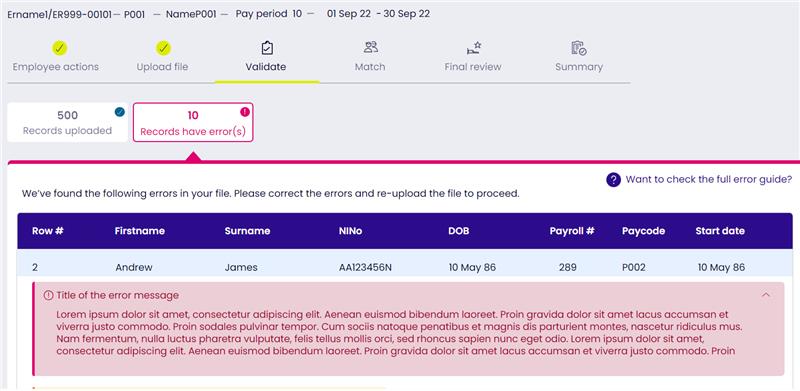
By choosing Download all errors, you can download an error log. This is a CSV file with information on all the errors in your current upload.
Choose Cancel and upload a new file. This deletes the whole pension data file, including rows with no errors. Once you’ve fixed all the errors, you can upload a new pension data file. Remember to include all the rows with no errors as well as revised rows with errors fixed.
If you get more errors after uploading a new file, you’ll need to repeat the process. You won’t be able to carry on with your upload until the field-level check finds no errors in any of the rows in your pension data file.
Matching queries
When you upload a pension data file, we cross-reference the data in the new file with the existing data in our system. If data in the new pension data file matches worker data in our system – that is, all the key fields are the same – the row for that worker will be accepted.
If the system finds some of a worker’s data doesn’t match data we already hold, we’ll raise a matching query during the upload process. You’ll need to confirm the reason why there’s a mismatch in the data.
Post-matching fixes
Once the member matching’s done – the records in the pension data file have been matched to the right workers and periods of service in the system – there are some additional checks to make sure the data that’s uploaded for those workers and periods of service is accurate.
If we find any errors, the row will show the key fields and a message describing the error. Here’s an example.
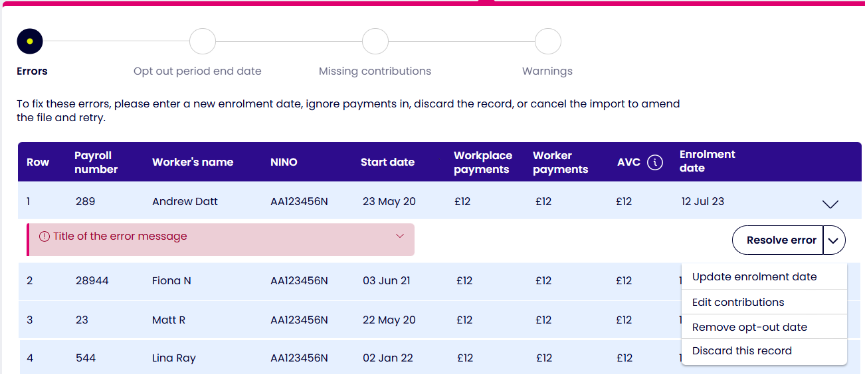
By choosing Download errors, you can download an error log. This is a CSV file with information on all the errors in your current upload.
You’ll need to resolve each error separately. The error message will show what options are available for you to resolve each error.
These are the errors you can fix during the upload process.
- Update enrolment date. If the error relates to the worker not being active this will re-enrol them into the scheme
- Edit contributions. If the contributions do not meet the minimum requirements you can provide revised figures to resolve the error.
- Remove opt-out date. Workers must opt out through now:u, if you are providing a new enrolment date and opt out date in the same file you can remove the opt out date so the worker enrolment is processed.
- Discard record. This means the whole row in the pension data file will not be processed.
- A NINO has nine characters.
- The first two characters must be letters, but
a. you can’t have D, F, Q, U or Y as the first or second letter
b. you can’t have O as the second letter
c. you can’t have any of these combinations: BG, GB, KN, NT, TN or ZZ. - The following six characters must be numbers.
- The last character must be A, B, C or D.
Field-level error messages
| Code | Error message | How to fix it |
| V104 | The pension data file contains duplicate periods of service for this worker. Please review your data file and remove the duplicate record. | Check your file and delete any duplicate periods of service you find. |
| V001 | Forename 1 is a mandatory field and must not be left blank | Make sure there’s a forename in this field. |
| V002 | Forename 1 must not exceed 40 characters | Check and shorten the name. |
| V186 | Forename 1 contains invalid characters | Change the name so it only contains letters, spaces, hyphens and apostrophes. |
| V005 | Forename 2 must not exceed 40 characters | Check and shorten the name. |
| V181 | Forename 2 contains invalid characters | Check the name. It must only contain letters, spaces, hyphens and apostrophes. |
| V007 | Surname is a mandatory field and must not be left blank | Make sure there’s a last name in this field. |
| V008 | Surname must not exceed 40 characters | Check and shorten the name. |
| V180 | Surname contains invalid characters | Check the name. It must only contain letters, spaces, hyphens and apostrophes. |
| V183 | NINO is not valid | The number itself could be incorrect, or correct but in the wrong format. See the NINO format section below. |
| V248 | There are records with same NINO that belong to different employees in the following rows in the file – {actual row #s which are all duplicate}. Please discard these records before uploading the file. If you are uploading two periods of service for same member please do one after the other by choosing the ‘add new worker’ option from the pay period once the original file is processed. | Your file has details for different workers with the with the same NINO. Check and delete the records with duplicate NINOs before you try uploading the file again. If you’re uploading two separate periods of service for the same worker, add one first and upload your file. Once the file has been processed, go into that pay period and add the second period of service by choosing Add new worker. |
| V015 | STARTDATE is a mandatory field and must not be left blank | Add the worker’s start date. |
| V016 | STARTDATE in invalid format | Check and correct the date format. It must be DD/MM/YYYY. |
| V156 | STARTDATE must be a valid calendar date | Check and correct the date. |
| V017 | STARTDATE of employment is after the end date of the current pay period | The worker’s start date can’t be after the end of the current pay period. Check and correct the date. |
| V155 | STARTDATE must not be more than 74 years earlier than the current date | Check and correct the date. |
| V018 | Title is a mandatory field and must not be left blank | Add the worker’s title. |
| V142 | Title contains invalid characters | Check the title. It must only contain letters, spaces, hyphens and apostrophes. |
| V020 | DOB is a mandatory field and must not be left blank | Add the worker’s date of birth. |
| V021 | DOB in invalid format | Check and correct the date format. It must be DD/MM/YYYY. |
| V144 | DOB is not a valid calendar date | Check and correct the date of birth. |
| V022 | Workers DOB is in the future | The worker’s date of birth can’t be in the future. Check and correct the date. |
| V135 | DOB cannot be on or after ENROL DATE | The worker’s date of birth can’t be the same as, or later than, their enrolment date. Check and correct the date of birth. |
| V136 | DOB cannot be on or after EXIT DATE | The worker’s date of birth can’t be the same as, or later than, their date of leaving. Check and correct the date of birth. |
| V134 | DOB cannot be on or after START DATE | The worker’s date of birth can’t be the same as, or later than, their start date. Check and correct the date of birth. |
| V023 | Worker is aged over 75 and is not subject to Auto Enrolment | Remove the enrolment date so you don’t accidentally re-enrol this worker. Or, remove the worker from your file. |
| V024 | Worker is aged under 16 and is not subject to Auto Enrolment | Remove the worker from your file. |
| V025 | SEX is a mandatory field and must not be left blank | Add M or F. |
| V026 | SEX must be either M or F | Correct to M or F. |
| V027 | PAYROLLNO is a mandatory field and must not be left blank | Add payroll number. |
| V028 | PAYROLLNO must not exceed 25 characters | Check and change payroll number. |
| V242 | PAYROLLNO contains invalid characters | Check the number. It can only contain numbers, letters and the following special characters: ” ‘ # $ > < % & ( ) [ ] { } – * + . : / = ? @ ! _ |
| V206 | The Contract details provided are already assigned to an existing record under this paycode. This functionality is to be used to add new employees or new contracts. If needed please update the contributions for the existing record in the Payrolls section of the portal or get in touch with us via web chat to discuss your options. | You’ll see this message if you upload a file to add a new worker and the paycode, payroll number and start date are the same as an existing worker’s record. You’ll either need to edit the existing record or ask us for help using webchat. |
| V029 | PAYSTART is a mandatory field and must not be left blank | Add the start date. |
| V030 | PAYSTART in invalid format | Check and correct the date format. It must be DD/MM/YYYY. |
| V164 | PAYSTART must be a valid calendar date | Check and correct the date. |
| V188 | PAYSTART cannot be more than one calendar month in the future | Check and correct the date. |
| V103 | PAYSTART should be the same for all rows | Check and correct the date. |
| V032 | The pay period start date is {dd/mm/yy} we are expecting {dd/mm/yy}. Please correct the value in your import file or update the expected value in the portal. If you are not able to update the pay period start date in the portal to a required value please get in touch with us via web chat to get the details modified. | The pay period start date is different from what now:u expects. Please update the pay period start date in your pension data file and in now:u. The format must be DD/MM/YYYY. If you can’t update the date in now:u, please ask us for help using webchat. |
| V207 | The earliest pay period start date you can provide is up to 3 months back dated from your Duties Start date. Please check and correct the details. | The pay period start date can’t be earlier than 3 months before your duties start date. Check and correct the date. |
| V240 | The pay period start date must be greater than the date provided for the previous pay period uploaded to this payroll. | The pay period start date must be later than the start date for the previous pay period you uploaded. Check and correct the date. |
| V033 | PAYPERIOD is a mandatory field and must not be left blank | Add the pay period number. |
| V034 | PAYPERIOD must be numeric. | Check and correct the pay period number to use numbers only. |
| V035 | PAYPERIOD must not exceed 2 digits | Check and correct the pay period number – it can only be 1 or 2 digits. |
| V102 | PAYPERIOD should be the same for all rows | Check and correct the pay period. |
| V208 | The pay period is {1} we are expecting {0}. Please correct the value in your import file or update the expected value in the portal. If you are not able to edit the pay period in the portal please get in touch with us via web chat to get the details modified. (1 and 0 will be the actual numbers.) | now:u is expecting a different pay period from the one you’re uploading. Please update the pay period number in your pension data file and in now:u. If you can’t update the number in now:u, please ask us for help using webchat. |
| V209 | Please check the pay period number added; as this doesn’t match with the frequency of the associated payroll. If you are not able to update the pay period in the portal to a required value please get in touch with us via web chat to get the details modified. | The pay period number you’ve added doesn’t match the payroll frequency. If you can’t update the pay period number in now:u, please ask us for help using webchat. |
| V036 | PAYFREQ is a mandatory field and must not be left blank | Add your payroll frequency. |
| V182 | Invalid payment frequency | Check and correct the payroll frequency. |
| V210 | The payment frequency is {1} we are expecting {0}. Please correct the value in the import file or please get in touch with us via web chat if the frequency for this payroll has changed (1 and 0 will be the actual payroll frequencies.) | Please update the payroll frequency in your pension data file and in now:u. If you can’t update the payroll frequency in now:u, please ask us for help using webchat. |
| V038 | ENROL DATE in invalid format | Check and correct the date format. It must be DD/MM/YYYY. |
| V138 | ENROL DATE must be a valid calendar date | Check and correct the date. |
| V040 | ENROL DATE should not be before STARTDATE | The enrolment date can’t be before the worker’s start date. Check and correct the date. |
| V041 | ENROL DATE should be before EXIT DATE | The enrolment date must be before the worker’s leaving date. Check and correct the date. |
| V110 | ENROL date and OPTOUT should not be provided together for the first time. Please either discard the record or the remove opt-out date before continuing with the upload. | You can’t have an enrolment date and an opt-out date in the same pension data file for the first time. Please remove the opt-out date and continue enrolling the worker. The worker can use now:u to opt out. You can then include the opt-out date in your next pension data file upload. |
| V187 | ENROL DATE must not be more than one calendar month in the future | Check and correct the date. |
| V191 | ENROL DATE cannot be provided when assessment is Worker | Only eligible and non-eligible jobholders and entitled workers can be enrolled. Please check the assessment as ‘worker’ is correct. If it is, remove the enrolment date. |
| V262 | Contributions provided for a worker who is not active. If the contributions are to be processed please edit the record to provide the new enrolment date. | You’ll see this if you upload a file with contributions for a worker who isn’t currently an active member. Workers must be enrolled before contributions can be accepted so you will need to provide the enrolment date. |
| V212 | ENROL DATE not supplied for worker who has requested to join and the workers earnings exceed the threshold for enrolment | Please check whether the worker is an entitled worker. If they are, they don’t qualify to be enrolled, so there’s no enrolment date. |
| V239 | The worker cannot be enrolled as the workplace has chosen to stop using now:pensions. | You can’t enrol new workers if you’ve chosen to stop using now:pensions. |
| V213 | ENROL DATE must be provided for the record to accept contributions for the contract | You’ll see this if a new period of service is added while resolving matching queries. You must add an enrolment date for now:u to accept contributions for the worker. |
| V250 | ENROL DATE must be provided when adding a worker to a previously submitted pay period. Please add the workers enrol date, or if they have not been enrolled then include the record in the next pay period to be loaded via the dashboard | You must include the enrolment date when you’re adding a worker to a pay period you’ve already submitted. If the worker hasn’t yet been enrolled, please include their details when you upload your pension data file for the next pay period. |
| V042 | POSTPONEMENT DATE in invalid format | Check and correct the date format. It must be DD/MM/YYYY. |
| V141 | POSTPONEMENT DATE must be a valid calendar date | Check and correct the date. |
| V145 | POSTPONEMENT DATE must not be greater than 4 months from current date | You can’t postpone assessing your workers for auto enrolment for more than 3 months. Please check and correct the date. |
| V146 | POSTPONEMENT DATE cannot be pre 01/10/2012 | Check and correct the date. |
| V043 | POSTPONEMENT DATE should not be before STARTDATE | Check and correct the date. |
| V044 | POSTPONEMENT DATE should not be after ENROL DATE; remove postponement date if enrolled. | You can’t postpone workers after they’ve been enrolled. Remove the postponement date from enrolled workers’ details. |
| V131 | POSTPONEMENT DATE cannot be provided when assessment is Worker | You can’t postpone someone whose assessment is ‘worker’, although you can postpone entitled workers. |
| V045 | ASSESSMENT is a mandatory field and must not be left blank | Add your assessment of the worker. |
| V046 | ASSESSMENT does not match any of the permissible options | Check and correct your assessment. |
| V047 | ADDRESS 1 is a mandatory field and must not be left blank | Add address line 1. |
| V150 | ADDRESS 1 contains invalid character(s) | Change the address so it only contains letters, numbers, spaces, hyphens and apostrophes. |
| V151 | ADDRESS 2 contains invalid character(s) | Change the address so it only contains letters, numbers, spaces, hyphens and apostrophes. |
| V152 | ADDRESS 3 contains invalid character(s) | Change the address so it only contains letters, numbers, spaces, hyphens and apostrophes. |
| V153 | ADDRESS 4 contains invalid character(s) | Change the address so it only contains letters, numbers, spaces, hyphens and apostrophes. |
| V154 | ADDRESS 5 contains invalid character(s) | Change the address so it only contains letters, numbers, spaces, hyphens and apostrophes. |
| V053 | POSTCODE is a mandatory field and must not be left blank | Check and add the postcode. |
| V143 | POSTCODE contains invalid character(s) | UK postcodes should only include letters and numbers. |
| V054 | POSTCODE must not exceed 8 characters | Check and correct the postcode. |
| V055 | EMAIL must not exceed 100 characters | Check and correct the email address. See Email address formats below for more about this. |
| V185 | EMAIL in invalid format | Please check and correct the email format. See Email address formats below for more about this. |
| V058 | SAL SACRIFICE is a mandatory field and must not be left blank | You must fill in this field to show whether you use salary sacrifice or not. |
| V059 | SAL SACRIFICE must be Y or N / Yes or No | Add Y or Yes if workers pay in to their pension savings through salary sacrifice. Add N or No if they don’t. |
| V260 | Contribution values in incorrect fields if using salary sacrifice – all contributions should be submitted as Employer payments | If workers pay through salary sacrifice, all contributions must be treated as workplace contributions and coded as ER CONTS. |
| V060 | EE CONTS must be numeric | Worker contributions must be in numbers. |
| V061 | EE CONTS cannot be negative | Check and correct the amount of worker contributions. |
| V062 | EE CONTS is limited to 2 decimal places | Check and correct the decimal places on the amount of worker contributions, for example: £350.50. |
| V251 | EE CONTS is limited to value of 999999.99 | now:u can’t process contributions of more than £999,999.99 in one pay period. Check and correct the contribution amount. |
| V214 | Please check the EE CONTS provided; the amount does not match the expected value based on Pensionable earnings and EE CONT %. Use the edit contribution option to provide revised figures. | The worker contribution amount doesn’t match what now:u expects, based on pensionable earnings and the workers’ contribution rate. Please use the edit contribution option to provide the revised figures. |
| V063 | ER CONTS must be numeric | Workplace contributions must be in numbers. |
| V064 | ER CONTS cannot be negative | Check and correct the amount of workplace contributions. |
| V065 | ER CONTS is limited to 2 decimal places | Check and correct the decimal places on the amount of workplace contributions, for example: £350.50 |
| V252 | ER CONTS is limited to value of 999999.99 | now:u can’t process contributions of more than £999,999.99 in one pay period. Check and correct the contribution amount. |
| V215 | Please check the ER CONTS provided; the amount does not match the expected value based on Pensionable earnings and ER CONT %. Use the edit contribution option to provide revised figures. | The workplace contribution amount doesn’t match what now:u expects, based on pensionable earnings and the workplace contribution rate. Please use the edit contribution option to provide the revised figures. |
| V066 | AVCS must be numeric | Workers’ extra contributions must be in numbers. |
| V067 | AVCS cannot be negative | Check and correct the amount of workers’ extra contributions. |
| V068 | AVCS is limited to 2 decimal places | Check and correct the decimal places on the amount of workers’ extra contributions, for example: £350.50. |
| V253 | AVCS is limited to value of 999999.99 | now:u can’t process workers’ extra contributions of more than £999,999.99 in one pay period. Check and correct the contribution amount. |
| V069 | OPTIN in invalid format | Check and correct the date format. It must be DD/MM/YYYY. |
| V157 | OPTIN must be a calendar date | Check and correct the date. |
| V158 | OPTIN cannot be pre 01/10/2012 | Check and correct the date. |
| V159 | OPTIN must not be greater than 1 month from current date | The opt-in date can’t be more than a month from today’s date. Check and correct the date. |
| V070 | OPTIN should not be before STARTDATE | The opt-in date can’t be earlier than the worker’s start date. Check and correct the date. |
| V071 | OPTIN should not be equal to OPTOUT DATE | If the worker has previously opted out, the opt-in date can’t be the same as the opt-out date. Check and correct the date. |
| V072 | OPTIN should not be after EXIT DATE | If the worker has left now:pensions, the opt-in date can’t be later than their leaving date. |
| V074 | OPTOUT in invalid format | Check and correct the date format. It must be DD/MM/YYYY. |
| V147 | OPTOUT must be a valid calendar date | Check and correct the date. |
| V148 | OPTOUT cannot be pre 01/10/2012 | Check and correct the date. |
| V149 | OPTOUT must not be greater than 1 month from current date | The opt-out date can’t be more than a month later than today’s date. Check and correct the date. |
| V075 | OPTOUT should not be before STARTDATE | The opt-out date can’t be earlier than the start date. Check and correct the date. |
| V137 | OPTOUT should not be before ENROLMENT DATE | The opt-out date can’t be earlier than the enrolment date. Check and correct the date. |
| V108 | OPTIN and OPTOUT should not both be provided in first pay period | Members can’t opt out before they’ve been enrolled. If a member has opted in, please enrol them into now:pensions. They’ll then be able to use now:u to opt out. |
| V076 | GROSS PAY must be numeric | Gross (before tax) pay must be in numbers. |
| V077 | GROSS PAY cannot be negative | Check and correct the amount of gross pay. |
| V078 | GROSS PAY is limited to 2 decimal places | Check and correct the decimal places on the amount of gross pay, for example: £350.50. |
| V254 | GROSS PAY is limited to value of 999999.99 | now:u can’t process gross pay of more than £999,999.99 in one pay period. Check and correct the amount of gross pay. |
| V080 | EXIT DATE in invalid format | Check and correct the date format. It must be DD/MM/YYYY. |
| V161 | EXIT DATE must be a valid calendar date | Check and correct the date. |
| V162 | EXIT DATE cannot be pre 01/10/2012 | Check and correct the date. |
| V166 | EXIT DATE must not be more than one calendar month in the future | The worker’s leaving date can’t be more than a month later than today’s date. Check and correct the date. |
| V081 | EXIT DATE should not be before STARTDATE | The worker’s leaving date can’t be earlier than the worker’s start date. |
| V083 | EE CONT % must be numeric | The workers’ contribution rate must be in numbers. |
| V084 | EE CONT % cannot be negative | Check and correct the workers’ contribution rate. |
| V085 | EE CONT % is limited to 2 decimal places | Check and correct the decimal places on the workers’ contribution rate, for example: 5.00. |
| V255 | EE CONT %is limited to value of 999.99 | now:u can’t process worker contributions of more than 999.99 percent in one pay period. Check and correct the percentage. |
| V086 | ER CONT % must be numeric | The workplace contribution rate must be in numbers. |
| V087 | ER CONT % cannot be negative | Check and correct the workplace contribution rate. |
| V256 | ERCONT %is limited to value of 999.99 | now:u can’t process workplace contributions of more than 999.99 percent in one pay period. Check and correct the percentage. |
| V088 | ER CONT % is limited to 2 decimal places | Check and correct the decimal places on the workplace contribution rate, for example: 3.00. |
| V089 | PAY CODE is a mandatory field and must not be left blank | Add pay code. |
| V090 | PAY CODE must be alphanumeric | Check the code. It can only contain numbers and letters. |
| V091 | PAY CODE must not exceed 4 characters | Make sure your pay code has no more than 4 characters. |
| V216 | The PAY CODE is {1} we are expecting {0}. Please ensure the correct PAY CODE is provided for this payroll. (1 and 0 will be the actual codes.) | now:u is expecting a different pay code from the one you’re uploading. Please check and, if necessary, correct the pay code for this payroll. |
| V092 | ER CODE is a mandatory field and must not be left blank | Add workplace code. |
| V093 | ER CODE must be alphanumeric | Check the code. It can only contain numbers and letters. |
| V094 | ER CODE must not exceed 4 characters | Make sure your workplace code has no more than 4 characters. |
| V217 | The ER CODE is {1} we are expecting {0}. Please ensure the correct ER CODE is provided for this payroll. (1 and 0 will be the actual codes.) | now:u is expecting a different workplace code from the one you’re uploading. Please check and, if necessary, correct the workplace code for this payroll. |
| V116 | SCHEME CODE provided does not match any of the active scheme tiers | Make sure all your scheme codes match your contribution models. |
| V096 | PENSIONABLE EARNINGS must be numeric | Pensionable earnings must be in numbers. |
| V097 | PENSIONABLE EARNINGS cannot be negative | Check and correct the amount of pensionable earnings. |
| V098 | PENSIONABLE EARNINGS is limited to 2 decimal places | Check and correct the decimal places on the amount of pensionable earnings, for example: £350.50. |
| V115 | Contributions for worker who has not been enrolled cannot be accepted. | These contributions are for a worker who has not been enrolled. now:u can’t accept them. |
| V219 | Contributions for worker who has opted out. Contributions will not be processed. | You’ll see this if you’re trying to upload contributions for a worker who has opted out. now:u won’t process the contributions. |
| V221 | Contributions for worker who has ceased active membership. Contributions submitted in this pay period will not be processed. | These contributions are for a worker who has stopped paying in. now:u won’t process them. |
| V222 | Contributions for worker who has left employment. Contributions cannot be processed as they post date the workers exit date. If the worker has been re-enrolled please use the update enrolment date option to provide the new date. If you want to continue contributions for the existing enrolment then please cancel the upload; remove the exit date via the Manage Workers section and then re-upload the file. | You’ll see this if you’re trying to upload contributions for a worker who has left their employment. If the contributions are valid then you will either need to: If the worker has returned for a new period of enrolment then provide the new enrolment date. If the contributions relate to the existing enrolment period you can remove the exit date from the Manage workers section. If the contributions are not valid then please select no payment due. |
| V223 | Contributions for worker who has exited the scheme. Contributions submitted in this pay period will not be processed as they post date the exit date. | You’ll see this if you’re trying to upload contributions for a worker who has left now:pensions because they’ve taken their money out, or have transferred out. now:u won’t process the contributions as they came in after the worker’s leaving date. |
| V237 | The worker has exited the scheme. Contributions submitted in this pay period will not be processed as they post date the exit date. | This refers to a worker who has died. now:u won’t process the contributions as they came in after the worker’s leaving date (the date they died). |
| V224 | The details you entered are the same as previously provided. If you don’t wish to make any changes then; please click ‘cancel’; otherwise please update the relevant details and then click ‘save’ | You’ll see this if you’ve been editing contributions in a pay period you’ve previously submitted but haven’t changed anything, and you save your changes. |
| V247 | Contributions cannot be submitted when the assessment is Worker. Please update the assessment type or remove the contributions. | You can’t submit contributions for an employee whose assessment is ‘worker’. If the assessment is wrong, please change it. Or, remove the contributions. |
| V225 | The total contribution percentages provided do not meet minimum percentages required as per the scheme code. | Check your workplace and worker contribution percentages and change them if necessary. |
| V226 | The employer contribution percentages provided do not meet minimum employer percentages required as per the scheme code. | Your workplace contribution percentages don’t meet the minimum your contribution model requires. Check your workplace contribution percentages and change them if necessary. |
| V227 | The total contribution percentages provided do not meet minimum percentages required as per AE regulations | Your total contribution percentages don’t meet the minimum auto enrolment requirements. Check your workplace and worker contribution percentages and change them if necessary. |
| V228 | The employer contribution percentages provided do not meet minimum employer percentages required as per AE regulations | Your workplace contribution percentages don’t meet the minimum auto enrolment requirements. Check your workplace contribution percentages and change them if necessary. |
| V229 | Provided pensionable earnings value exceeds the limit. Maximum value that can be specified for pensionable earning is 999999.99; please check and correct | now:u can’t process pensionable earnings of more than £999,999.99 in one pay period. Check and correct the amount. |
| V230 | Please check the NINO provided; as it is already assigned to a different worker. Please flag this matching query as an error so that the NINO can be removed; and you can proceed with the upload. If the existing contract holds the incorrect NINO this can be removed via the Manage Workers section after the upload has been completed. | The NINO for the worker you’re adding is the same as for an existing worker. Please flag this as an error so the NINO can be deleted and you can carry on uploading your file. If you need to change the existing worker’s NINO you can do this in Manage workers after you’ve uploaded the file. |
| V231 | You cannot select create a new worker as it will result in two workers with the same NINO. If the record in the import file is a different worker to the existing contracts; please flag this matching query as an error so that the NINO can be removed; and you can proceed with the upload. If the existing contract holds the incorrect NINO this can be removed via the Manage Workers section after the upload has been completed. | You can’t choose Add new worker as the new worker’s NINO is the same as an existing worker. If the new member you’re trying to add is different from the existing workers, please flag this as an error so the NINO can be deleted and you can carry on uploading your file. If you need to change the existing worker’s NINO you can do this in Manage workers after you’ve uploaded the file. |
| V232 | This contract has already been matched against row # (already matched row #) from your import file. You therefore cannot select same person. Please correct this file record; or row # (already matched row #) if it is available to edit. Otherwise please cancel the file upload; edit the required fields in the file and resubmit. | This period of service has the same paycode, payroll number and start date as an existing period of service. Please check and, if necessary, correct the new period of service or the existing period of service. Or cancel the file upload, edit your file and try uploading it again. |
| V233 | You cannot select this option as a contract with the same payroll number and start date already exists under the workplace and payroll. Please correct this file record otherwise cancel the upload; edit the required records in the file and resubmit. | This period of service has the same payroll number and start date as an existing period of service. Please check and correct your file. Or cancel the file upload, edit your file and try uploading it again. |
| V234 | You cannot select the option to update the details of an existing record when using the add new worker file upload function. To correct the contribution details of an existing record please select the relevant pay period in the Payroll section of the portal. | You can’t update an existing record when you’re uploading a file or using Add new worker. From your dashboard, you’ll need to go into Payroll and choose the pay period you want to edit. |
| V235 | There are some matching queries against records in the submitted file. Please login to your Now Pensions portal to resolve the queries and complete the import. | The file you’ve uploaded has matching queries. Please log in to now:u to fix the queries and finish importing your file. |
| V236 | We have identified some missing active contracts for the pay period being submitted. Please login to your Now Pensions portal to provide the details for the missing contracts and complete the import. | There are missing periods of service in the pay period you’ve uploaded a file for. Please log in to now:u to add the missing periods of service and finish importing your file. |
| V244 | We need to know the optout period end dates for the jobholders you are trying to enrol. Please login to your Now Pensions portal to provide the date and complete the import. | There are missing opt-out period end dates for the workers you’re trying to enrol. Please log in to now:u to add the missing dates and finish importing your file. |
| V264 | When providing the option of Maternity/Paternity leave the total contribution amount cannot be zero. | If contributions are to be submitted for the worker then please enter the relevant values. If no contributions are to be processed, select no payments due instead of Maternity/Paternity leave. |
| V265 | You must select “No payments due”; if total of workplace contribution, worker contribution and AVC is equal to zero. | If no contributions are to be processed for the worker then please select no payments due. |
Warnings
| Code | Warning | What you need to do |
| V241 | This is a blank row which will be ignored | You don’t need to do anything – now:u will ignore the blank row. |
| V014 | NINO missing – only OK within 6 months of employment start | Check and add the NINO. |
| V112 | Changing the ENROL DATE from DD/MM/YYYY to DD/MM/YYYY will generate a new enrolment communication and start a new opt out period | You’ll see this if you try to change the enrolment date for a member who has opted out, stopped paying in, left employment, retired or transferred out. |
| V261 | The ENROL DATE supplied for worker who has requested to join is same as previous enrolment. So will not generate a new enrolment for the member in the system. | You’ll see this if a worker who has previously opted out or stopped paying in asks to rejoin, but you’ve tried to use their old enrolment date. Please put the new enrolment date in. |
| V211 | ENROL DATE changing from DD/MM/YYYY to DD/MM/YYYY. The worker is already active so the update to the enrol date will not be processed. | You’ll see this if you upload a file with a new enrolment date for a worker who is currently enrolled and paying contributions. The enrolment date won’t change. |
| V119 | ENROL DATE not supplied for worker who has requested to join | Please check and add an enrolment date for the worker. Triggered if the pay period starts before the member’s opt-in date. |
| V238 | ENROL DATE not supplied for worker who has requested to join | Please check and add an enrolment date for the worker. Triggered if pensionable earnings are below the auto enrolment threshold. |
| V249 | The details are for worker who has exited the scheme. The details submitted in this pay period will not be processed as they post date the exit date. | You’ll see this if you try to upload details for a worker who has retired, transferred out of now:pensions, or died. now:u won’t process the details. |
| V048 | ADDRESS 1 exceeds 100 characters | Edit the address to less than 100 characters. |
| V049 | ADDRESS 2 exceeds 100 characters | Edit the address to less than 100 characters. |
| V050 | ADDRESS 3 exceeds 100 characters | Edit the address to less than 100 characters. |
| V051 | ADDRESS 4 exceeds 100 characters | Edit the address to less than 100 characters. |
| V052 | ADDRESS 5 exceeds 100 characters | Edit the address to less than 100 characters. |
| V243 | The workers email address has already been provided for a different worker. Using the same email for different workers is a security risk. | Check the email address. If necessary, ask the worker for another email address and upload this in your pension data file. |
| V073 | OPTIN date detected in your payroll file. If this worker is to be enrolled in a subsequent pay period please ensure that an ENROL DATE is provided in the relevant file | If you’re going to enrol this worker in the next pay period, please make sure you include an enrolment date for them in your pension data file. |
| V106 | OPTOUT date should not be provided unless previously enrolled | You can’t give an opt-out date for a worker who doesn’t have an enrolment date. |
| V107 | OPTOUT date should not be provided if worker has not opted out from the scheme | You can’t give an opt-out date for a worker who hasn’t opted out of now:pensions. |
| V117 | OPTOUT date not supplied for worker who has opted out | You must include an opt-out date for a worker who has opted out. |
| V163 | EXIT DATE is in the future and will be processed when EXIT DATE attained | The worker’s leaving date is in the future. now:u will process it when the leaving date is reached. |
| V099 | PENSIONABLE EARNINGS should not exceed GROSS PAY; unless salary sacrifice is being used | The amount of pensionable earnings can’t be higher than the amount of gross pay unless the workers pay in to their pension savings through salary sacrifice. |
| V218 | Contributions for worker who has opted out. Contributions will not be processed. | You’ll see this if you’re trying to upload contributions for a worker who has opted out. now:u won’t process them. |
| V220 | Contributions for worker who has ceased active membership. Contributions submitted in this pay period will be processed. | You’ll see this if you’re uploading contributions for a worker who has stopped paying in. now:u will process them. |
| V114 | Contributions for worker who has left employment. Contributions submitted in this pay period will be processed. | You’ll see this if you’re uploading contributions for a worker who has left employment. now:u will process them. |
| V263 | Contributions do not match the expected amount based on the earnings provided for a worker who is not an active member of the scheme. Contributions will not be processed. | You’ll see this if you’ve uploaded contributions for a worker who is no longer paying in to now:pensions. now:u won’t process them. |
Email address formats
All email addresses must follow this format for now:u to accept them.
An email address has three sections.
Section 1
This must start with a letter or number. After the first character, this section can have letters, number, one or more full stops, and any of the following special characters: ~ “ # $ % & ‘ * + / + ? ^ _ { } – !
Section 2
This must start with @. After that, it can contain letters, numbers or any of the following special characters: _. –
Section 3
This must start with a full stop. After that, it must have two or more letters or numbers. Many UK email addresses end in .com or co.uk.
Here are some examples.
st4r3rw0rld42@made-up-mail.co.uk
National Insurance number (NINO) formats
All NINOs must follow this format.
As well as this, the following combinations aren’t valid NINOs.
| AA000000A |
| AB123456C |
| AA123456A |
| AA000000B |
| BB000000B |
| AB123456A |
| AB000000A |
| AA111111A |
| AA010190A |
| CC000000C |
| AB123456B |
| AA000000C |
| AB123456D |
| AA123456B |
| AB000000C |
| AA000000D |
| AB000000B |
| BB000000A |
| AC000000A |
| AA000001A |
| AA999999A |
Exception and bulk correction uploads
The table below shows the additional validations that are applied to the exception and bulk correction upload processes.
| Code | Error message | How to fix it |
| BE001 | We are unable to process your file due to it being in an invalid format. Please ensure the file format is .csv. | Save your file in CSV format and re-upload it. |
| BE002 | We are unable to process your file as it does not contain any information. Please upload a different file. | nowu does not accept empty files, input the required information before uploading again. |
| ES004 | We are unable to process your exception file as it does not contain the correct column headers in the first row. | Please download the correct file format from nowu |
| BC005 | We are unable to process your correction file as it does not contain the correct column headers in the first row. | Please download the correct file format from nowu |
| ES011 | Sequence ID is a mandatory field. Please enter the Sequence ID created for this exception schedule. | Make sure the correct Sequence ID is in this field |
| ES012 | Sequence ID does not match the value created for this schedule. Please enter the Sequence ID created for this exception schedule. | Make sure the correct Sequence ID is in this field |
| ES013 | Request Date is a mandatory field. Please enter the Request Date created for this exception schedule. | Make sure the correct Request date is in this field |
| ES014 | Request Date does not match the value created for this schedule. Please enter the Request Date created for this exception schedule in DD/MM/YYYY format. | Make sure the correct Request date is in this field |
| ES015 | Forename field is mandatory. Cannot leave this field blank. | Make sure there’s a Forename in this field |
| EXS020 | The worker details provided do not match to a permitted contract for the exception schedule. Please check the details to ensure that they match to the latest contract for the worker. If the worker does not exist under the workplace you cannot load a contribution via the exception schedule. | Please ensure the values in the Forename, Surname, NINO, DOB, STARTDATE and PAYROLLNO fields match the values held in nowu for the contract |
| ES021 | The contribution exception file contains duplicate periods of service. Please review your data file and remove the duplicate record | Remove the duplicate record from the file. |
| ES022 | Contributions cannot be accepted for this worker as they are not an active member of the scheme. | Contributions can only be accepted to contracts that have previously held an active status. Remove the row from the file if the contract does not meet this requirement. |
| ES023 | Contributions cannot be accepted for this worker as the period for which the contributions are specified are after they have exited the scheme | You’ll see this if you’re trying to upload contributions for a worker who has taken their money, or transferred out, and the period for the exception contribution is after their exit date. Amend the period for the exception schedule to allow contributions. |
| ES052 | Contributions have not been included for this worker. Please provide the contribution amounts to be processed or remove the record from the file. | Please add the relevant contributions to the record or remove the row from the file. |
| ES055 | Non or Partial Payment Reason Code needs to be blank or 1 | Add 1 or leave the field blank. 1 is used to confirm parental leave. |
| BC012 | Internal Schedule Reference is a mandatory field. Please do not change this value from the downloaded file. | Make sure the correct Internal schedule reference is in this field. The value provided in the download file should not be amended. |
| BC013 | Internal Schedule Reference does not match the value for this schedule. Please do not change this value from the downloaded file and ensure you are trying to upload the file against the correct pay period. | Make sure the correct Internal schedule reference is in this field. The value provided in the download file should not be amended. |
| BC014 | Internal Schedule – Member Contract Reference is a mandatory field. Please do not change this value from the downloaded file. | Make sure the correct Internal schedule reference is in this field. The value provided in the download file should not be amended. |
| BC015 | A worker record cannot be found for the Internal Schedule – Member Contract Reference provided. Please do not change this value from the downloaded file. | Make sure the correct Internal schedule – Member contract reference is in this field. The value provided in the download file should not be amended. |
| BC016 | The correction data file contains duplicate Internal Schedule – Member Contract References. Please review your data file and remove the duplicate record. | Remove the duplicate record, or reference number, from the file. |
| BC017 | You cannot update the record for this worker as their contract status means corrections cannot be made. Please remove the record from the file. | Remove the record from the file as corrections cannot be made to the record. |
| BC018 | You cannot change the worker name in the correction file. Please do not change this value from the downloaded file. | Please do not update the values provided in the download file for this field. |
| BC019 | You cannot change the worker NINO in the correction file. Please do not change this value from the downloaded file. | Please do not update the values provided in the download file for this field. |
| BC020 | You cannot change the worker DOB in the correction file. Please do not change this value from the downloaded file. | Please do not update the values provided in the download file for this field. |
| BC021 | You cannot change the worker Start Date in the correction file. Please do not change this value from the downloaded file. | Please do not update the values provided in the download file for this field. |
| BC022 | You cannot change the worker Payroll No. in the correction file. Please do not change this value from the downloaded file. | Please do not update the values provided in the download file for this field. |
| BE031 | EE CONT % must be provided where Pensionable Earnings are greater than zero. | The field cannot be blank, please enter the correct value even if this is 0.00 |
| BE036 | ER CONT % must be provided where Pensionable Earnings are greater than zero. | The field cannot be blank, please enter the correct value even if this is 0.00 |
| BE041 | Please check the EE CONTS provided; the amount does not match the expected value based on Pensionable earnings and EE CONT %. | The worker contribution amount doesn’t match what now:u expects, based on pensionable earnings and the workers’ contribution rate. Please use the edit contribution option to provide the revised figures. |
| BE046 | Please check the ER CONTS provided; the amount does not match the expected value based on Pensionable earnings and EE CONT %. | The workplace contribution amount doesn’t match what now:u expects, based on pensionable earnings and the workers’ contribution rate. Please use the edit contribution option to provide the revised figures. |
| BC051 | The details you entered are the same as previously provided. If you don’t wish to make any changes then; please do not put the correction indicator against this record. | The values provided in the EE CONTS, ER CONTS, AVCs and EXIT DATE fields match what we already hold. Please provide the corrected values. |
| BC062 | EXIT DATE value cannot be changed in correction file. | An EXIT DATE exists on the contract, changes to exit dates are not permitted via a correction upload. |
| BC063 | Non or Partial Payment Reason Code needs to be 1 or 2 or blank | Add 1, 2 or leave the field blank. 1 is used to confirm parental leave. 2 is used to confirm no payment is due |
| BC064 | You cannot provide ‘Non or Partial Payment Reason Code’ as 1 when there are no contributions. Please select the reason code 2 if there are no contributions to be processed | Please update the values in the contribution fields, or non/partial payment code. |
| BC065 | You cannot provide ‘Non or Partial Payment Reason Code’ as 2 when contributions are included in the file. Please either remove the contributions or the reason code | Please update the values in the contribution fields, or non/partial payment code. |
| BC066 | Correction Indicator field cannot have a value other than Y | Please enter a value of Y or leave blank |
| BC067 | This record will not be processed as the ‘Correction Indicator’ has not been provided for this record. | Input a Y in the correction indicator field if updates are required or ignore this warning if no updates are to be processed. |