now:u creates payroll schedules based on your payroll frequency. You must upload data for each schedule so the correct contributions are paid.
When you upload data for each schedule, check the PAYSTART and PAYPERIOD values in the file match the expected values in now:u for the next period to be uploaded.
If the values don’t match, the upload will be rejected.
Pay period start dates do not match
If now:u shows the wrong value for the schedule you’re trying to upload, edit it on your Dashboard by choosing the pencil icon shown in the screenshot below:
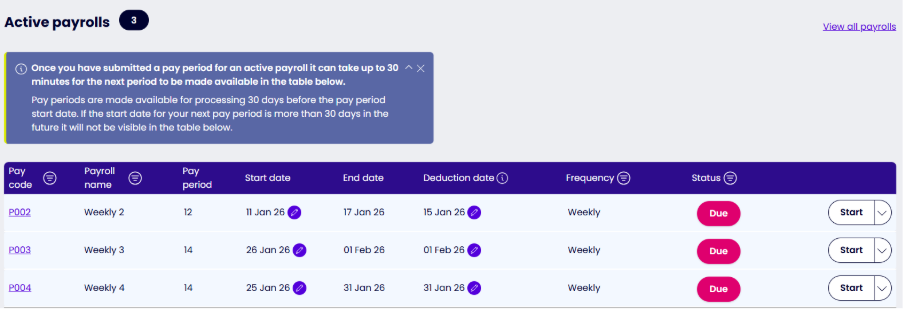
Choosing the pencil icon will show a calendar confirming the date range that’s allowed for the change.
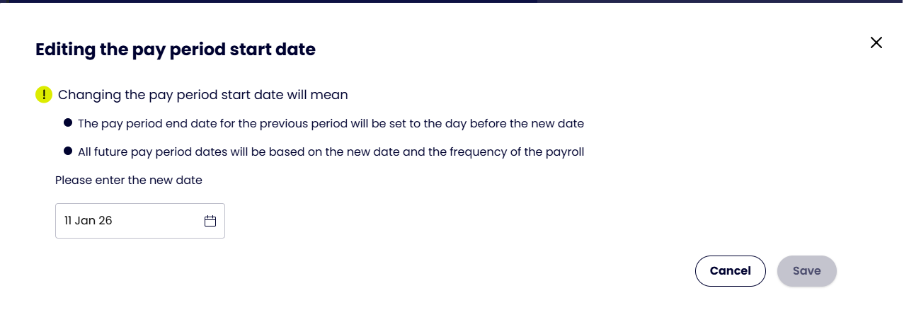
If the start date you need isn’t in the date range allowed, please contact us on live chat.
The edit option will not be available if the due date for the schedule is more than 70 days in the past. If you need to edit a value but the pencil icon isn’t shown, please contact us on live chat.
Once you’ve updated the value to match the one included in your upload and saved your changes, continue with the upload. Future start dates will be recalculated based on the value you’ve put in.
Pay period values don’t match
You can only edit pay period values when your payroll reaches its reset limit. This can happen at any point in the year, depending on your payroll system settings. It’s often linked to the start of the tax year.
When the pay period value becomes editable, the Dashboard will show a pencil icon next to the pay period number.
now:u only accepts certain updated values linked to the frequency of your payroll. If you can’t make the change needed, or you need a change that doesn’t tie in with the reset limit, please contact us on live chat.